



How tiny, physical switches learn to follow instructions (part 4/5)
In part 3, the switches learned to remember: the tower now has a heartbeat, registers, and RAM. What it still lacks is any connection to the 97 lines from part 1. The program is a list of numbers sitting in a chip, and the machinery is a pile of wires waiting for inputs. This part builds the bridge between the two.
The loop that isn't a loop
Ok, so now we have time and memory, and the CPU really comes into play. On each tick, it fetches the instruction the program counter points at, works out what it means, does it, bumps the counter.
But this "CPU loop" isn't driven by a while statement. It's simply the clock ticking, the program counter changing, and the frozen logic from part 2 reacting to the new instruction, the way it always reacts to its inputs. Static wires with values moving through them. The program runs because time passes.
The program counter (PC) is just a counter:
Register(in=registerIn, load=true, out=registerOut);
Inc16(in=registerOut, out=registerOutInc);
Mux16(a=registerOut, b=registerOutInc, sel=inc, out=registerOutIncSelected);
Mux16(a=registerOutIncSelected, b=in, sel=load, out=registerLoadSelected);
Mux16(a=registerLoadSelected, b=false, sel=reset, out=registerIn);
The chip's own pins are in, three control bits (inc, load and reset), and an output: the address of the current instruction. "Where am I in the program" lives on that output wire.
Line 1 is the register, and it has load=true (hardwired on). After we went to all that trouble building a register that can choose to hold or change, this one stores every single tick, unconditionally. The register always stores whatever is on registerIn and the rest of the chip exists to decide what registerIn should be.
Line 2 is the Inc16: it takes the register's current value and puts current-plus-one on a wire.
Lines 3 to 5 are three choosers in a row, each one a standing question about what the register stores next:
- Bump it? The first Mux picks between the current value and current-plus-one, selected by
inc. - Jump somewhere? The second Mux picks between whatever the first chose and
in— the jump target — selected byload. - Start over? The third Mux picks between whatever the second chose and
false, selected byreset.
The third Mux's output is registerIn, which loops back into line 1. It's the Bit chip's feedback circle from part 3 again, with three decisions delegated into the Muxes. And the order of the chain is a priority list: each later Mux can throw away everything the earlier ones chose, so reset beats load, and load beats inc.
Run it forward. In normal execution inc is 1 and the other two are 0, so every tick the register re-stores its own value plus one: 0, 1, 2, 3, the machine moving one instruction per tick. When an instruction wants to jump, it puts the target address on the in pin and raises load for one tick, and the register swallows the target instead of the plus-one. And reset is a physical input wired out of the chip to the outside world: hold it high and the third Mux forces a 0 into the register, so the machine fetches instruction 0, the first line of the program. That's all a reboot is.
Ok, so what sets the in pin for the PC? What decides when load goes high? The answer is the chip the PC lives inside: the CPU, our robot butler from part 2.
Anatomy of an instruction
But before we open the butler up, look at what arrives at it. The CPU's main input is one instruction: sixteen bits, one line of part 1's ninety-seven rows of 1s and 0s. Each bit means something.
Bit 15, the leftmost, is the switch that decides how to read everything else. If it's 0, this is an A-instruction (address instruction): the other fifteen bits are simply a number, to be loaded into a register called A. You've seen one. Here's @1 from part 1's list:
0 000000000000001
│ └── the number 1
└── bit 15 = 0: A-instruction
If bit 15 is 1, this is a C-instruction (compute instruction), and the fifteen bits split into fields:
| Bits | What they say |
|---|---|
| 14–13 | unused (always 1) |
| 12 | second operand: the A register, or memory? |
| 11–6 | what to compute — six bits, and you know exactly six control bits that need setting: the ALU's |
| 5–3 | where to store the result: A register, D register, memory — one bit each |
| 2–0 | jump if the result is negative / zero / positive — one bit each |
Here's a real one, also from part 1's list (in part 5, this will turn out to be the instruction that adds our two 1s):
1 11 1 000010 010 000
│ │  │ │      │   └── jump bits: 000 = never jump
│ │  │ │      └────── destination bits: 010 = store in D
│ │  │ └───────────── compute bits: 000010 = D + M (the ALU's six control bits)
│ │  └─────────────── a-bit: 1 = second operand comes from memory, not A
│ └────────────────── unused, always 11
└──────────────────── bit 15 = 1: C-instruction
Notice that an A-instruction spends all fifteen bits on one field (just a number), and a C-instruction slices the same fifteen bits into five kinds of information. And bit 15 is the switch that tells the hardware which is which.
Inside the CPU
So now that you understand instructions, we're ready to look at the heart of our robot butler, the CPU (the full chip is about 30 lines; these are the ones that matter):
And(a=instruction[15], b=true, out=isCInstruction);
Not(in=isCInstruction, out=isAInstruction);
...
Mux16(a=aRegisterOut, b=inM, sel=instruction[12], out=mux2Out);
ALU(x=dRegisterOut, y=mux2Out, zx=instruction[11], nx=instruction[10], zy=instruction[9], ny=instruction[8], f=instruction[7], no=instruction[6], out=ALUOut, zr=zr, ng=ng);
...
PC(in=aRegisterOut, load=shouldJump, inc=shouldIncrement, reset=reset, out[0..14]=pc);
Start with the first two lines: they read bit 15 (to determine which kind of instruction it is), and fan it out as two wires, isCInstruction and isAInstruction. That's the butler reading the menu, and the menu has exactly the two entries you just saw: load a number, or compute something.
Now look hard at the ALU line, because I owe you an answer from part 2. The ALU's six control inputs are wired to instruction[11] down to instruction[6]. That's the compute field from the form, sliced straight out of the instruction and run into the ALU. The CPU never reads the instruction and works out what it means. The instruction's bits are physically connected to the machinery they control. The 1s and 0s from part 1 are voltages on wires, and the wires run into the ALU. The numbers don't get interpreted. They get conducted.
And there, on the last line, is our PC. Every dangling pin finally wired. Its in comes from the A register, one of the butler's two scratch registers: that's where a jump target sits, having been loaded there by an earlier instruction. Its load is a wire called shouldJump, computed by a small cluster of gates from three bits of the instruction (the jump bits) and two summary bits from the ALU ("was the result zero?", "was it negative?"), so "jump if the result was zero" is, physically, a handful of Ands and Ors raising one wire. Its inc is just NOT-shouldJump: not jumping means stepping forward. And reset passes straight through from outside the chip.
Memory is more than RAM
This is my Memory chip:
RAM16K(in=in, load=loadRam, address=address[0..13], out=ram16out);
Screen(in=in, load=loadScreen, address=address[0..12], out=screenOut);
Keyboard(out=keyboardOut);

Mux16(a=ram16out, b=screenOut, sel=screenAddressed, out=ramOrScreenOut);
Mux16(a=ramOrScreenOut, b=keyboardOut, sel=keyboardAddressed, out=out);
"Memory" on this machine is more than RAM. It has three parts: the RAM16K (general storage), the Screen, and the Keyboard. The address decides which one you're talking to:
0x0000–0x3FFF: RAM — ordinary storage.0x4000–0x5FFF: the Screen — writing here makes pixels appear.0x6000: the Keyboard — reading here gets the last key pressed.
And look at what does the routing: Muxes again. The same chooser that built part 3's Bit chip now decides whether your read comes back from RAM, the screen, or the keyboard.
The CPU writes 16 bits to an address, and that is all it does. The Memory chip decides what the address means. Write to address 0x1234 and you've stored a number; write the same 16 bits to 0x4123 and you've lit pixels on a screen. The CPU does not know pixels exist. This is called memory-mapped I/O, and it's the entire trick by which the machine touches the world. Hold on to this idea. Part 5's best moment depends on it!
The whole computer in three chips
Memory(in=memoryOutCPU, load=memoryWriteCPU, address=memoryAddressCPU, out=memoryOut);
CPU(inM=memoryOut, instruction=instruction, reset=reset, outM=memoryOutCPU, writeM=memoryWriteCPU, addressM=memoryAddressCPU, pc=pcOut);
ROM32K(address=pcOut, out=instruction);
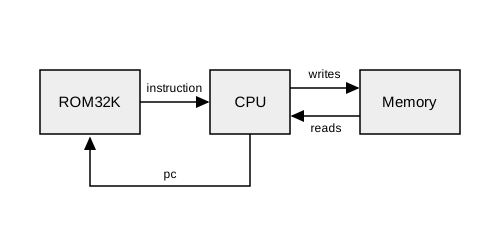
And that's everything. The whole computer is three chips. The ROM32K holds the program. Part 1's 97 lines sit in there, and it continuously emits whichever line the program counter points at. The CPU computes. The Memory stores, and touches the world. Three parts, with three bundles of wires looping between them: the PC tells the ROM where we are, the ROM hands the CPU the current instruction, the CPU reads and writes Memory. If you're feeling slightly cheated (surely there's more?), there isn't. That's the machine.
Step back and look at what's running. This loop is the butler from part 2, finally on duty. Part 1 ended with a list of numbered orders. Part 2 built a thing that could act on one of them. Part 3 gave it a heartbeat and a memory. This part wired the orders straight into the machinery, and now the machine reads them, one tick at a time.
And notice what the whole ascent so far has added to part 2's tower of dead NAND switches: a heartbeat, the ability to remember, and wires running from the instruction bits to the parts they control. That's the entire difference between a pile of switches and a thing that runs. Complexity, more and more, looks like an illusion built from simple things.
In part 5, we'll finally press "go" and see how 1+1 actually becomes 2.